
Entities
Give your models a home.
Define fields, descriptions, and constraints in a shared logical model.
Logical first. Format aware.
Design the logical shape of your data. Reuse it across schemas, APIs, and events.
Public project. Self-hosted application.
email is optional
{
  "$schema": "https://json-schema.org/draft/2020-12/schema",
  "title": "Customer",
  "type": "object",
  "properties": {
    "id": {
      "type": "string"
    },
    "name": {
      "type": "string"
    },
    "email": {
      "type": "string"
    }
  },
  "required": [
    "id",
    "name"
  ]
}
Review the generated artifact, field types, and optionality before adopting an output.
Same entity, different representations. Examples illustrate the workflow; generation and validation happen in the application.
Target support has format-specific limits. Review the generated artifacts and diagnostics before using them.
From definition to delivery
Follow a Customer definition from shared meaning to a published version. Choose a step, then explore the decisions inside it.
01 / Model the meaning
Select a field to inspect its intent.
| Field | Logical type | Presence |
|---|---|---|
string | Required | |
string | Required | |
string | Optional |
Field intent
Email address used for customer communications.
Classification records governance intent. Configure the corresponding controls in downstream systems.
model Customer {
  @doc("Stable customer identifier.")
  id: string;
  @doc("Customer display name.")
  name: string;
  @doc("Email address used for customer communications.")
  email?: string;
}
Start visually, paste a definition, or import a supported schema. Make the meaning and logical shape clear before reviewing any physical format.
02 / Connect definitions
An order can reference a Customer. An API can return one. An event can use one as its payload. Select a reference to see how the shared entity is used.
Shared logical entity
id: stringname: stringemail?: stringReference in focus
The response points to a Customer schema component. Its fields describe the same logical customer, rather than an independently defined shape.
responses:
  "200":
    description: Customer found
    content:
      application/json:
        schema:
          $ref: "#/components/schemas/Customer"
Reuse custom scalars, enums, and unions as well as entities. This diagram illustrates declared references; it does not discover runtime data flow or synchronize running systems.
03 / Generate and inspect
| Field | Logical intent | Target type |
|---|---|---|
id | string · required | string · required |
name | string · required | string · required |
email | string · optional | string · may be omitted |
What to inspect
JSON Schema properties are optional unless named in required. Here, id and name are required; email may be omitted.
{
  "$schema": "https://json-schema.org/draft/2020-12/schema",
  "title": "Customer",
  "type": "object",
  "properties": {
    "id": { "type": "string" },
    "name": { "type": "string" },
    "email": { "type": "string" }
  },
  "required": ["id", "name"]
}These are static examples, not a browser-based compiler. Generate and validate real artifacts in the application. Format support differs; review each output before adopting it.
04 / Publish deliberately
A draft adds an optional phone field. Publish the example, then choose which published Customer version a sample event references.
v1.0This definition stays fixed.
v1.1Review the added field before publishing.
The example starts with v1.0 published and v1.1 in draft.
Consumer reference
A version pin keeps this example tied to a chosen published definition.
This consumer uses the three-field v1.0 definition.
This illustration changes only the example on this page. Real publishing requires the application, review of change impact and target diagnostics, and a deliberate choice of referenced versions.
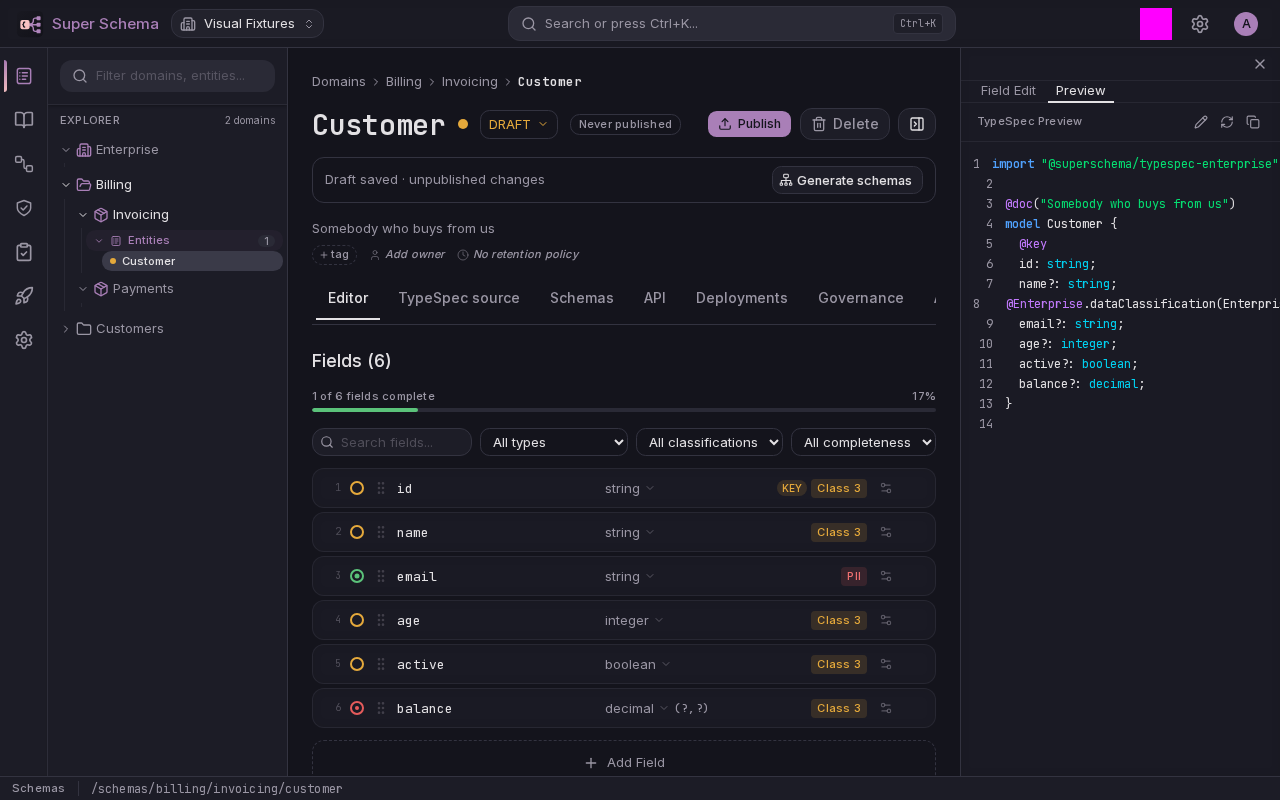
Inside the workbench
Move between the visual field editor and the TypeSpec view. Keep the definition close to the decisions that shape it.
Around the shared model
Fields are a start. Relationships, contracts, and change history give the model a life beyond its first schema.
Entities
Define fields, descriptions, and constraints in a shared logical model.
Reusable types
Share enums, custom scalars, and unions across your modeling workspace.
Relationships
Reference other entities and explore the relationships you have modeled.
Schema generation
Generate supported schema and DDL artifacts, then inspect the output and diagnostics.
API contracts
Describe operations, parameters, and responses with shared definitions.
Event contracts
Design AsyncAPI 3.0 contracts visually, using entities as message payloads.
Governance metadata
Record classification, retention, and quality rules alongside your definitions.
Published versions
Separate drafts from published versions and pin references to a known version.
Start with one entity
Explore the workflow, then make it your own.